PDF Table Extractor
Turn messy financial PDFs into clean, structured Excel tables. Instantly.
Financial PDFs are notoriously inconsistent: merged cells, broken lines, skewed PDF-to-text conversion, multi-level headers, misaligned columns, split rows across pages. Generic tools fail. Online extractors butcher numbers. OCR tools guess wrong. PDF Table Extractor is the first macOS app designed specifically for financial documents, not generic PDFs.
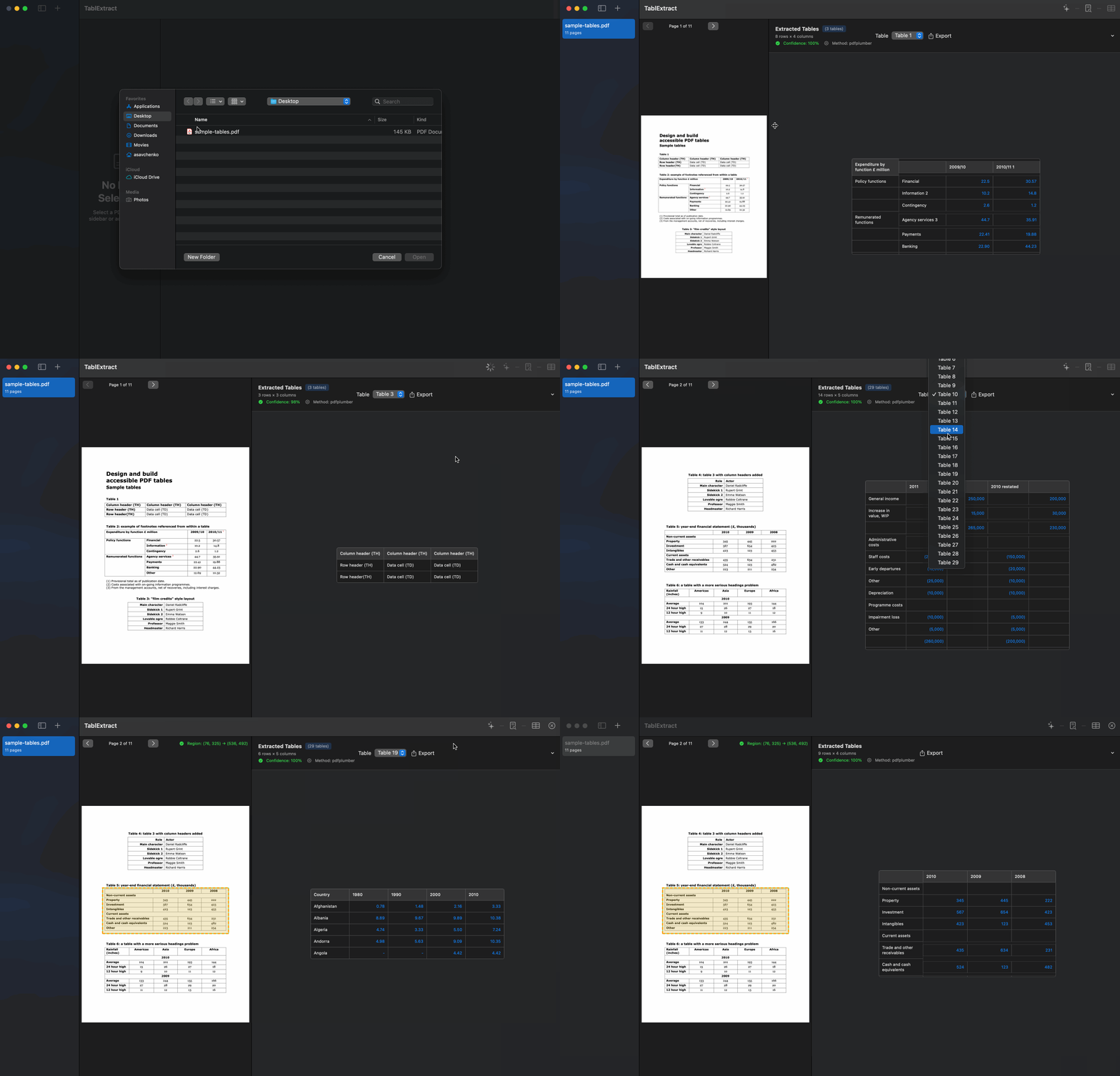
From PDF → Excel → Analysis in seconds.
Drop in a PDF
Financial statements, lender notices, reports
Extract tables
Automatic or manual selection
Review the preview
Side-by-side comparison
Export to Excel
Clean, structured, ready to analyze
Why PDF Table Extractor Is Better
Versus Adobe Acrobat
- ✓Handles multi-row headers correctly
- ✓Preserves numeric formatting
- ✓Can handle multi-page tables
- ✓Reconstructs aligned columns perfectly
Versus Tabula
- ✓Automatic table detection (no manual selection needed)
- ✓Handles merged cells correctly
- ✓Understands financial formats
- ✓Stitches tables across pages
Versus Online Extractors
- ✓Works offline — no security risk
- ✓No file size limits
- ✓Accurate on complex tables
- ✓Handles lender notices and financial statements
Versus OCR Tools
- ✓Converts to structured tables, not just text
- ✓Understands numeric types and currencies
- ✓Preserves financial structure
Versus Python Scripts
- ✓No coding required
- ✓No debugging or maintenance
- ✓Faster and more consistent results
- ✓Works on real-world messy PDFs
Built for analysts — not for generic PDF users.
Extracting tables should not be your job. Analyzing them should be.
Example Workflows
Lender Notice → Excel → Cashflow Schedule
Extract interest/principal tables directly and feed them into NoticeParser.
Financial Statements → Model Input
Extract revenue, expenses, EBITDA, debt tables, and drop them into your model.
Management Reports → KPI Templates
Convert messy PDF tables into structured KPI sheets.
Each workflow becomes <10 seconds.
Features
Everything you need in PDF Table Extractor
Multi-Table Financial Extraction
Extracts multiple tables from the same PDF, even if structures differ from page to page. Works perfectly for lender notices, borrowing base tables, fee schedules, portfolio company reporting, debt/interest statements, management presentations, and audit reports.
True Table Structure Rebuilding
Uses positional heuristics, line density, vector analysis, and text grouping to reconstruct tables exactly as intended. Handles broken lines, merged cells, collapsed row boundaries, multi-column headers, and multi-line cells — far beyond what common extractors like Tabula can do.
Financial Number Intelligence
Understands financial formatting: ($12,345) → -12345, 8.5% → 0.085, 1,234.50 → 1234.5, "12 345,55" (EU) → 12345.55. Handles parentheses for negative numbers and currency symbols ($, €, £, CAD, AUD). Your numbers land in Excel already cleaned and usable.
Page Stitching & Table Reconstruction
If a table spans multiple pages or section breaks, PDF Table Extractor merges them automatically — preserving continuity correctly. This is rare, highly valuable, and almost no commercial tool handles it well.
Manual Table Selection Mode
When PDFs are extremely messy or non-standard (e.g., scanned PDFs with artifacts), you can manually draw a selection box to force extraction. Advanced users appreciate the precision.
Export Perfect Excel Files
Export to XLSX (structured tables), CSV, JSON, or Clipboard (paste directly into Excel or Sheets). Structured data, no cleanup needed.
Frequently Asked Questions
Does it work offline?
Yes — fully offline. Safe for confidential documents.
Can it handle scanned PDFs?
Yes — manual selection mode + OCR-supported extraction (v2 improvement).
Does it preserve table structure?
Yes. Rebuilt column widths, headers, and numeric types are preserved.
Can it extract multiple tables?
Yes — fully automated.
Will it break with merged cells or weird formatting?
No. Its table engine is designed specifically for real-world financial PDFs.
Ready to get started with PDF Table Extractor?
One-time purchase. No subscription. Works 100% offline on your Mac.